Product
Research, drafting and review, in one workspace.
PLAI is built around one habit: show the source. Everything below is designed so you can check what the AI relied on.
AI Chat and Legal Research
Answers grounded in Pakistani law
Ask a question and PLAI retrieves passages from its collections of Pakistani legislation and judgments, answers from them, and lists the documents it used next to the answer.
- A sources panel shows which statutes and judgments were retrieved for each answer.
- Attach a document to a conversation and ask questions about it.
- Specialist assistants for areas such as litigation, compliance and drafting.
- Research memos with the retrieved authorities, exportable to Word or PDF.
Judgment Search
Find the judgment, not just an answer
A structured search over more than 50,000 superior-court records. Pick a court, case type, law-report series and year, or search by case number, then open the judgment or attach it to a conversation.
- Dropdown-first filters, because case types and citations are written inconsistently across courts.
- Where a field was not published, the result says so instead of guessing.
- Attach the full judgment to a chat when its text is available.
Our collections are large but not complete. They cover the courts and instruments we have been able to collect.
Drafting
From intake form to court paper
Choose one of 31 document types, answer a short intake form, and watch the draft take shape on a court-paper preview. Edit it, save versions, and export.
- Petitions, plaints, written statements, notices, agreements and opinions, in English with Urdu labels and search.
- Review flags point to anything that needs a lawyer’s attention.
- Version history with notes, and Word or PDF export with your chosen layout.
- Every draft carries a notice that a qualified advocate must settle it.
Document review
Read contracts and notices faster
Upload a contract, notice or judgment for analysis, compare two versions, and ask follow-up questions in chat with the document in view.
- Analysis of PDFs, images and scanned documents.
- Side-by-side comparison of two documents.
- Ask a follow-up and the document is carried into the conversation.
Matters
Everything for a case in one place
A board of your matters. Open one to see its chats, research memos, pinned judgments, drafts and documents, plus a timeline.
- Set a matter as active and new work is filed to it.
- Record the facts and your instructions once; chat reads them.
- Pin the judgments that matter to the matter.
Included from the Solo Pro plan upward.
Agents and workflows
Multi-step work, automated
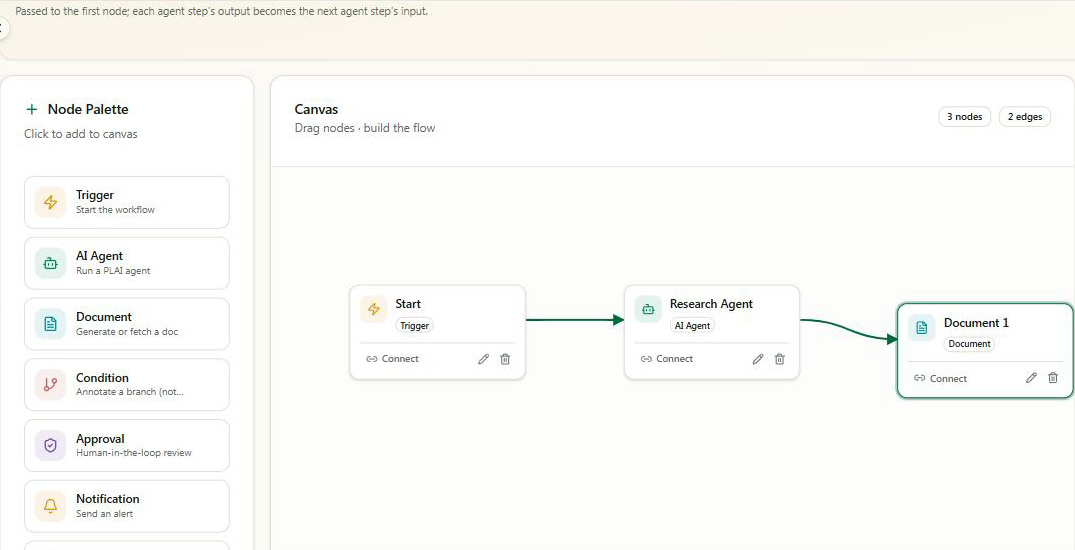
Launch a specialist agent, run deep research, or build a workflow that chains steps such as research, analysis and drafting.
- A roster of specialist agents grouped by research, litigation and compliance.
- A visual workflow builder with a step-by-step results panel.
- Agent steps draw on the same legal collections as chat.
Included from the Solo Pro plan upward.